
What is XRM.Copilot?
XRM.Copilot is Microsoft’s AI-powered assistant built into the Power Platform and Dynamics 365 ecosystem. In model-driven apps, Copilot helps users by generating natural language responses, surfacing insights, and suggesting actions.
To extend this capability, Microsoft introduced the XRM.Copilot Web APIs, allowing developers to programmatically interact with Copilot through client-side code. This means we can now build custom Copilot-powered experiences in Dynamics 365 CE.
Why Do We Need XRM.Copilot APIs?
Business users often need context-aware AI assistance—whether it’s drafting a response to a customer email, summarizing a case, or suggesting next steps in a sales opportunity.
With XRM.Copilot APIs, developers can:
- Automate Copilot interactions with record data.
- Customize prompts for different scenarios (service, sales, field service).
- Capture AI responses and push them into forms or workflows.
- Extend model-driven apps with tailored AI experiences.
This transforms Copilot from being a passive chat assistant into an active business productivity partner.
Quick Testing in the Browser Console
Before writing full-fledged scripts, you can test Copilot APIs directly in the browser console (F12 → Console).
Example:
Xrm.Copilot.executePrompt("Hello", function(response) {
    console.log("Copilot response:", response);
});
Sample Output:
{
  "id": "00000000-0000-0000-0000-000000000000",
  "replyToId": "000000000-0000-0000-0000-000000000000",
  "text": "Hello, how can I help you today?",
  "speak": "Hello, <break strength=\"medium\" /> how can I help?",
  "type": "message",
  "timestamp": "2025-00-00T00:00:00.5068122+00:00"
}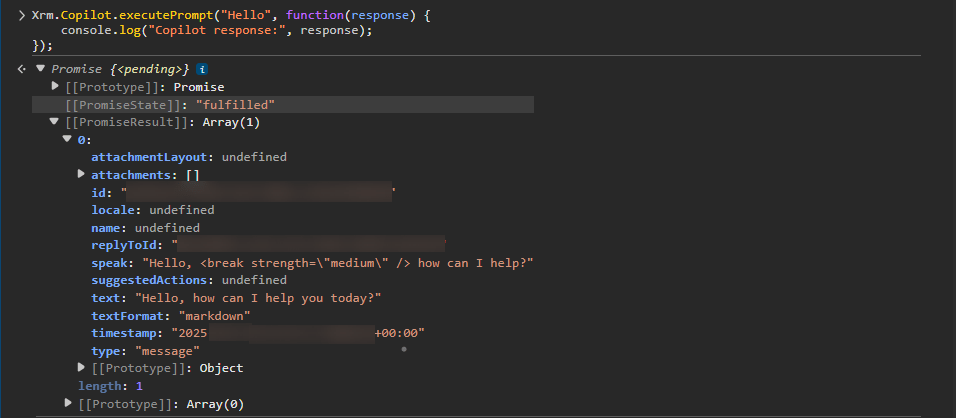
This is a quick way to confirm if Copilot SDK is enabled and working in your environment.
Common Error: Org Language Not Supported
If you try this in another tenant and see an error like:
CopilotSDKFeatureHidden: Copilot SDK is not available based on IsCopilotFeatureEnabled.
Reason: Org language not supported (Status: Hidden)
This means your environment’s base language is not supported by Copilot SDK yet.
- The Copilot UI may still be visible, but the API calls are blocked.
- Workaround: Use an environment where the base language is English (US) or another supported language.

Implementing in Model-Driven Apps
Once you’ve confirmed the SDK works, you can embed it in model-driven apps using ribbon buttons or form events.
Example: Generate Case Resolution (Ribbon Button)
This script adds a button “Generate Resolution” to the Case form and sends the description to Copilot.
function generateCaseResolution(primaryControl) {
    try {
        var formContext = primaryControl;

        // Get case description
        var caseDescription = formContext.getAttribute("description").getValue();

        if (!caseDescription) {
            Xrm.Navigation.openAlertDialog({ text: "Please add a case description before using Copilot." });
            return;
        }

        // Define the Copilot prompt
        var promptRequest = {
            input: "Suggest a professional resolution note for this support case: " + caseDescription
        };

        // Call Copilot
        Xrm.Copilot.executePrompt(promptRequest).then(
            function (response) {
                if (response && response.output) {
                    Xrm.Navigation.openAlertDialog({
                        title: "Copilot Suggestion",
                        text: response.output
                    });
                } else {
                    Xrm.Navigation.openAlertDialog({ text: "No response from Copilot." });
                }
            },
            function (error) {
                console.error(error);
                Xrm.Navigation.openAlertDialog({ text: "Error calling Copilot API: " + error.message });
            }
        );
    } catch (e) {
        console.error(e);
        Xrm.Navigation.openAlertDialog({ text: "Unexpected error: " + e.message });
    }
}
This is a good mock/test script for experimenting before moving into production.
Why This Matters for Dynamics 365 CE
For Dynamics 365 CE modules like Customer Service, Sales, and Field Service, Copilot APIs deliver:
- AI-driven productivity → Generate summaries, responses, or recommendations.
- Business-specific customization → Prompts aligned to your org’s workflows.
- Developer extensibility → Move beyond OOTB Copilot and embed it where it matters.
The Future of XRM.Copilot
This is just the beginning. Expect:
- Broader language support (removing today’s limitation).
- Deeper Dataverse integration for structured AI insights.
- AI + Power Automate orchestration to combine intelligence with automation.
- Industry-specific copilots for sales, service, marketing.
Just as approval flows transformed approvals, Copilot APIs will transform daily user workflows in Dynamics 365 CE.
Wrap-Up
The XRM.Copilot Web APIs bring the power of AI into model-driven apps, giving developers tools to craft custom prompts, capture responses, and integrate Copilot into business processes.
- Start small by testing in the console.
- Move into development with ribbon button integrations or with Web Resorces.
The future of Dynamics 365 CE is Copilot-powered — and now you can start building that future today.

Leave a comment