
There is a limitation with List rows present in a table action which only return 256 rows only.
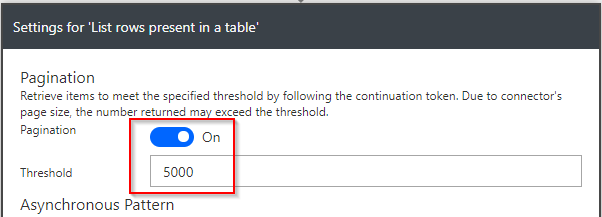
We can retrieve more rows by setting a higher value for the pagination settings.
- Go to “List rows present in table” action
- Select the options elipses (“…”)
- Select ‘Settings’
- Enable Pagination
- Set an appropriate Threshold value
- Click on “Done” button. The ‘List rows…’ action will now return all the rows.
Please see the below screenshots for more details:


Leave a comment